My role focused on redesigning the interface across platforms, transforming a feature-heavy prototype into a clearer, more structured product experience for review workflows, client presentations, and multi-user collaboration.
SpaceForm
Designing a coherent interface layer for cross-device XR environments
UNStudio and Bjarke Ingels Group partnered with Squint/Opera to develop Spaceform — a cross-platform tool for design review, presentation, and collaborative decision-making in spatial environments.
The challenge was not just visual polish, but clarity at scale — designing an interface that remains consistent across desktop and VR, manages complexity, and supports collaboration without competing with the spatial environment.
The work establishes a coherent visual and interaction language that maintains consistency while supporting the flexibility required in spatial computing.
Press: ArchDaily, Architect Magazine, Archinect, blooloop
UNStudio x BIG x Squint/Opera
Cross companies and departments, e.g., Architects, Strategists, Engineers, Product Planning, etc.
Samsung Galaxy XR · OneUI World Sensing XR
Shipped product
Product: spaceform.io
Problem
As the platform evolved, the interface became increasingly fragmented:
These issues broke continuity — forcing users to constantly reorient as they moved between tools, workflows, and devices. The challenge was not just visual consistency, but designing an interface layer that could scale — bringing clarity, structure, and continuity across devices and workflows.
Approach
The redesign focused on establishing a coherent interface layer across desktop and VR, guided by four principles:
Designing for continuity across desktop and VR
Desktop and VR serve different roles in the product experience. Designing across desktop and VR is not about matching features — it’s about maintaining continuity across fundamentally different interaction contexts.
Platform 01
Desktop as operational layer
Supports broad participation across teams and clients, acting as the primary surface for coordination, content access, and session control.
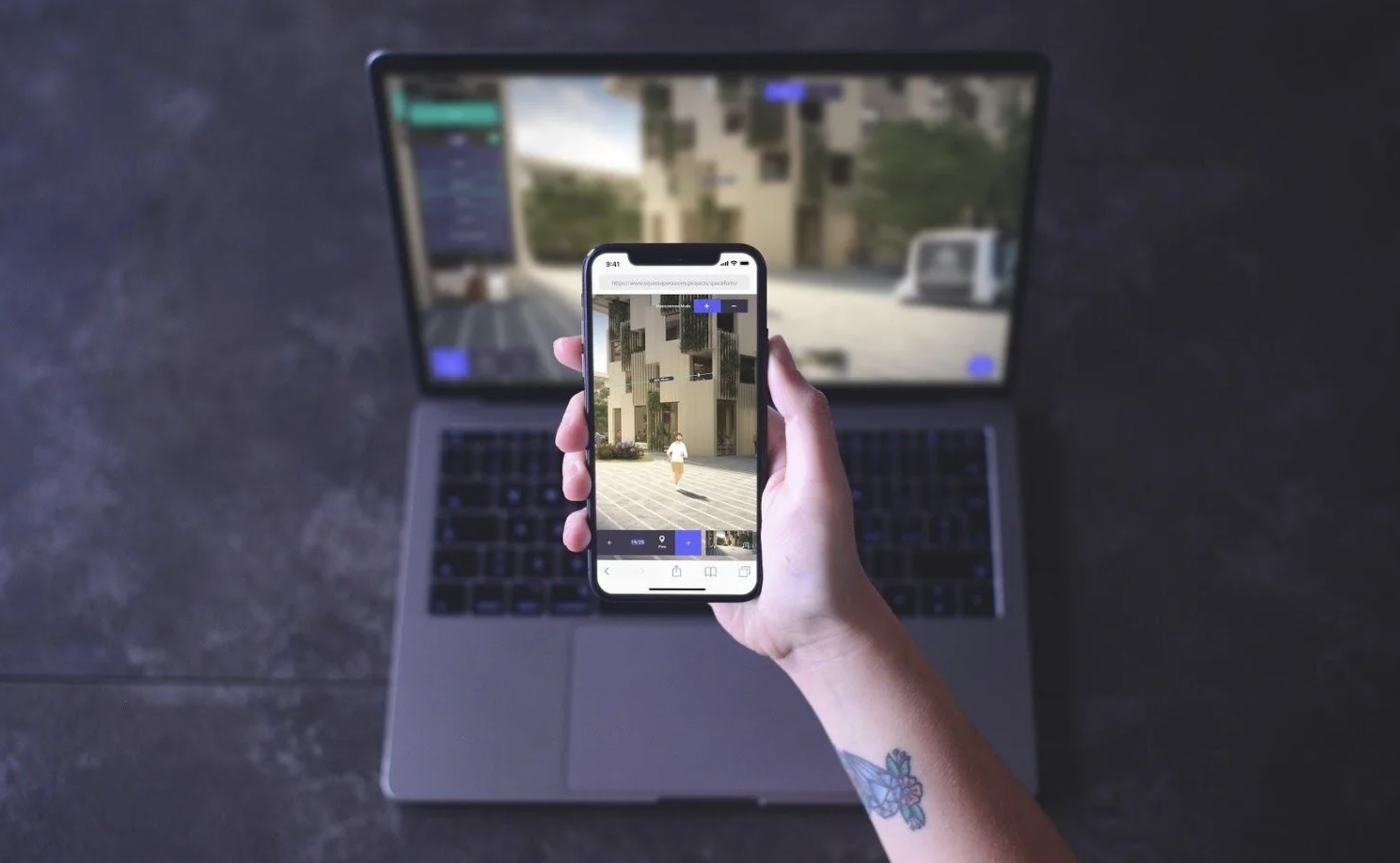
Platform 02
VR as depth layer
Extends the experience into immersive review, where scale, atmosphere, and embodied understanding are best experienced directly.
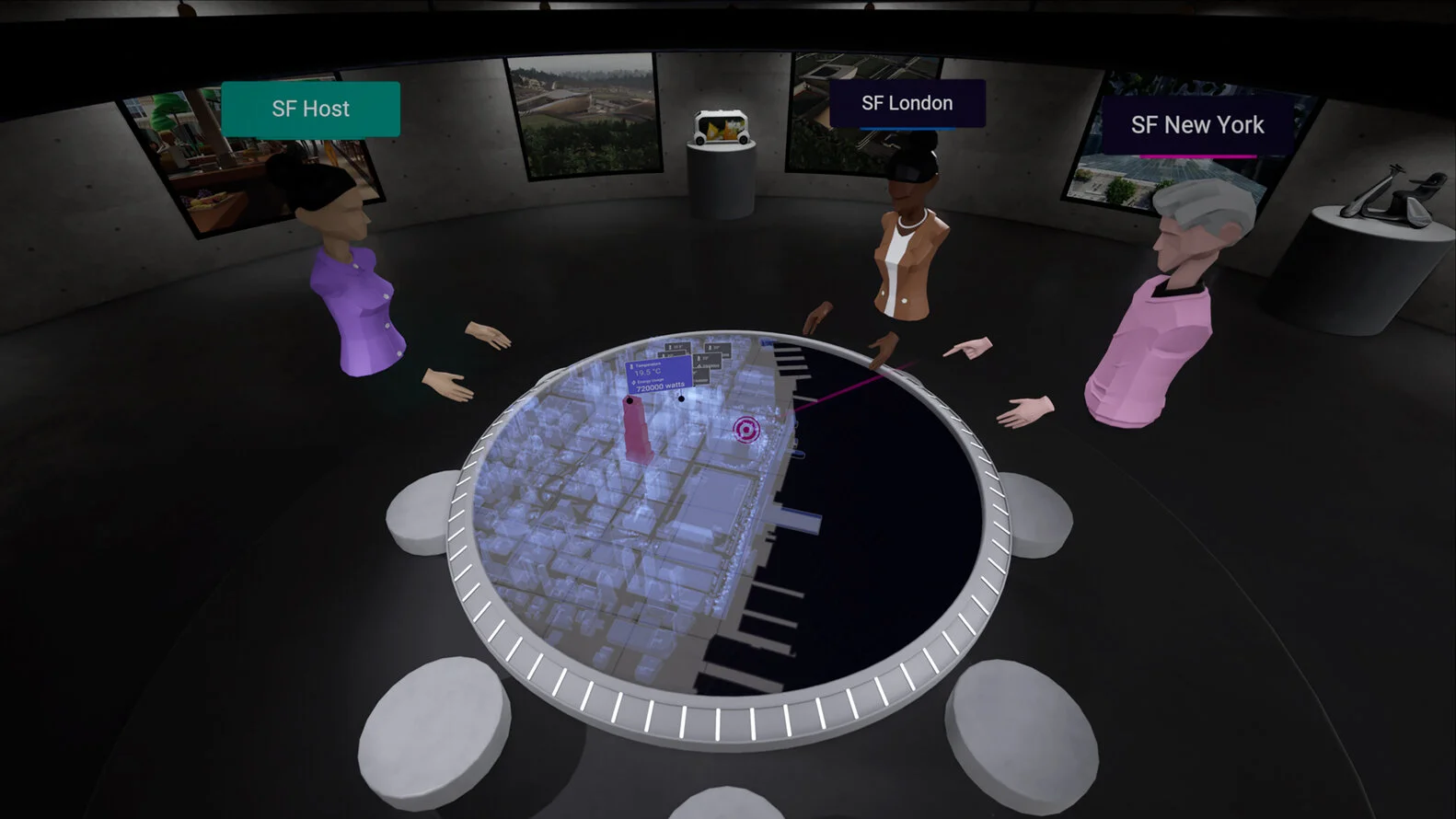
Rather than forcing feature parity across platforms, the design prioritizes continuity. Core concepts, naming, and hierarchy remain consistent, while density and interaction cost adapt to the device. This allows the experience to feel coherent without requiring desktop and VR to behave the same way.
Layering the interface for clarity
The interface was structured as a layered system to manage complexity across workflows, users, and devices — keeping core actions persistent while progressively revealing depth only when needed. This structure allows the interface to scale from lightweight review to complex workflows without losing clarity.
Primary interface
Persistent core controls for navigation, communication, participant awareness, and review. These remain visible across sessions and devices to anchor orientation.
Secondary interface
Contextual layers — such as scene galleries, notifications, and tool trays — that expand on demand. This allows the system to hold complexity without overwhelming the default view.
Tertiary interface
Specialized tools like measurement, uploads, and advanced scene actions. Separated from the main flow to support expert workflows without disrupting shared collaboration.
Cross-device continuity
The hierarchy preserves a consistent mental model across desktop and VR, while adapting density, scale, and interaction cost to each platform.


Visual system for spatial clarity
The visual system was designed to make controls legible in complex, multi-user spatial environments without competing with the space itself. Rather than emphasizing visual novelty, the system prioritizes clarity during presentation, collaboration, and review — keeping attention on spatial content instead of interface chrome. The goal was not to reduce UI, but to control when and how it appears.
Hierarchy
Controls are layered to prioritize primary actions while keeping secondary tools accessible, allowing users to stay oriented without losing access to deeper workflows.
Density
Interface density adapts to task complexity — staying lightweight during shared viewing, and expanding only when interaction depth is required.
Modularity
Components are designed as reusable modules that scale across features and contexts, supporting product growth without introducing inconsistency.


Onboarding as a system entry point
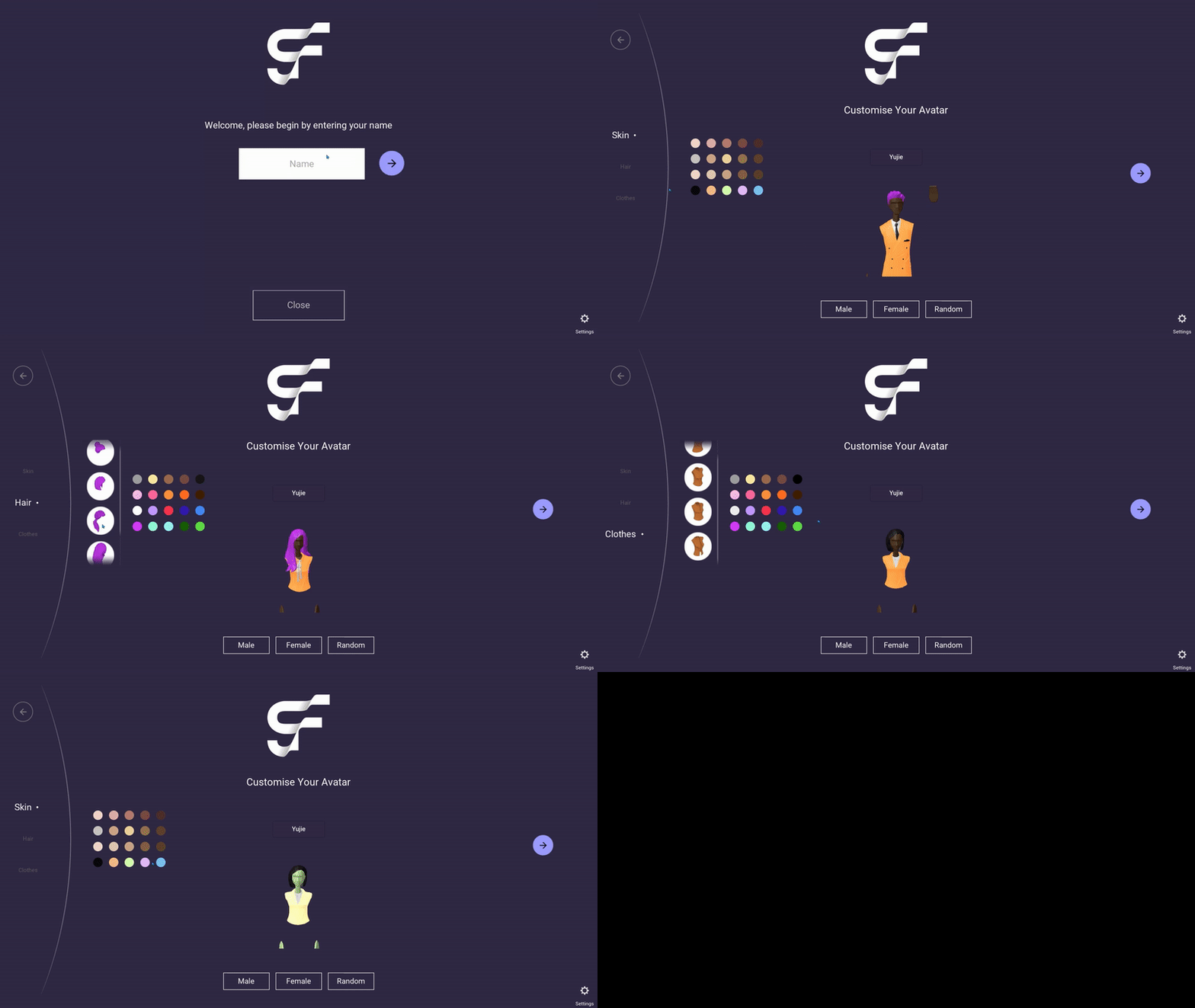
Onboarding is the first place users encounter the system’s logic. The original onboarding flow was linear and repetitive, requiring users to move back and forth across multiple steps when defining identity attributes.
I redesigned it as a compact, wheel-based system that groups related decisions and reduces unnecessary traversal — allowing users to make changes fluidly within a single view.
More importantly, the new structure aligns onboarding with the broader product system: lightweight, modular, and easy to scan.
This ensures that onboarding doesn’t just collect input — it establishes the same interaction patterns and hierarchy used throughout the product.
From fragmented tools to a unified interface
Starting point
The existing tool surfaces were fragmented and inconsistent. Controls for measurement, content access, and scene management operated as separate layers, forcing users to navigate between disconnected interaction models.
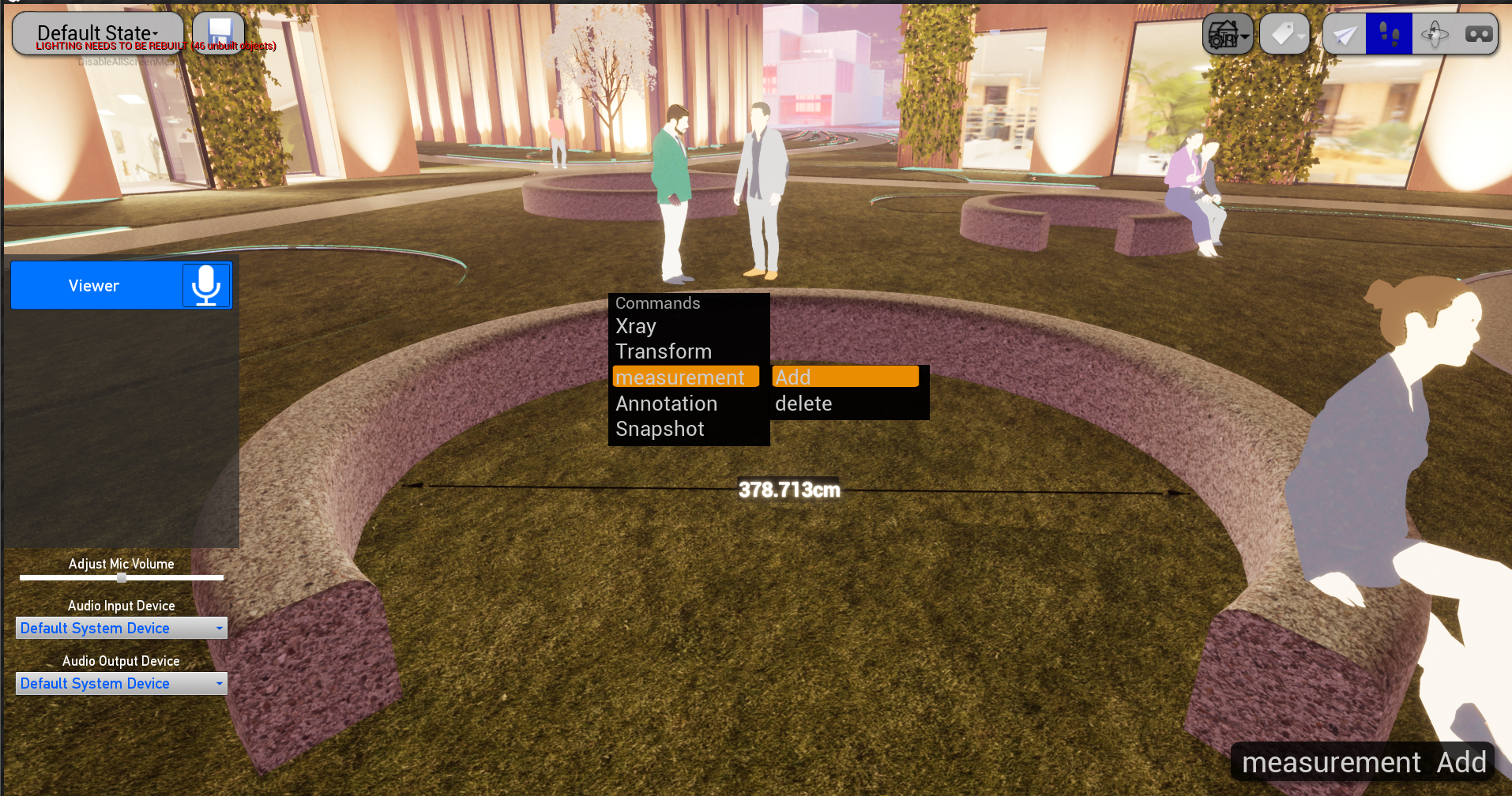
Integration
The redesign unified these tools within a shared interface system — aligning them under the same hierarchy, interaction patterns, and visual language.
Rather than treating tools as independent features, each surface was positioned within the overall structure, allowing users to move seamlessly from presentation to action without switching mental models.
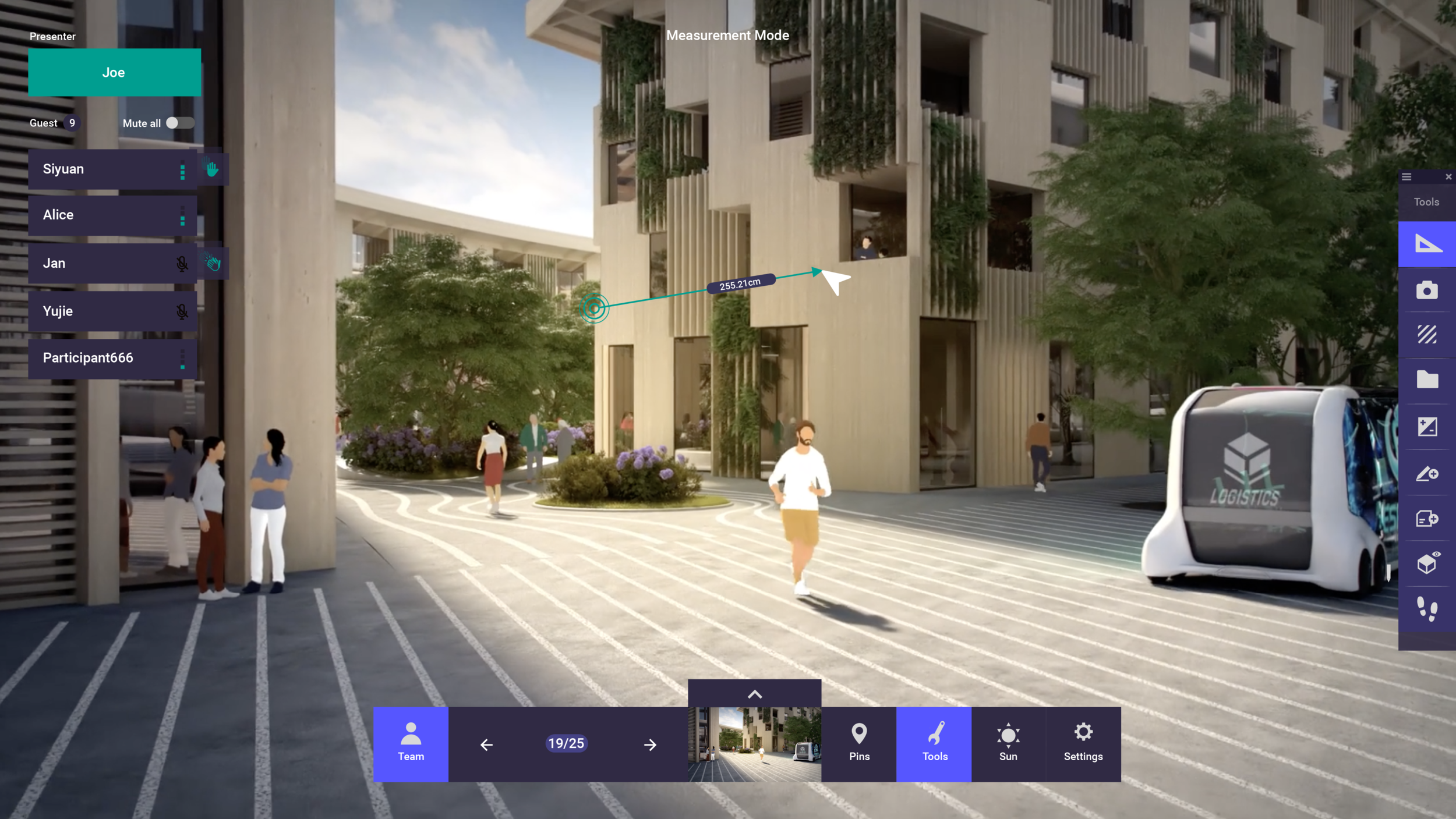
Interface in use
Not every tool needs equal prominence — but each needs a clear place in the interface.
Impact and Outcome
Impact 1
Product
The redesigned interface has shipped with the product since 2021 and continues to support real-world use today.
Impact 2
Design Contribution
Established a coherent interface system for multi-user spatial workflows — improving clarity, scalability, and consistency across desktop and VR, while enabling more complex collaboration without sacrificing usability.
Impact 3
Outlook
This work shaped my approach to designing interfaces across devices and contexts — informing my current work on XR and cross-device systems.
Next project